Help & FAQ/Import guides
Export your Notion workspace
Export your Notion workspace as an HTML or Markdown & CSV zip, and PrivacyNotes strips Notion's 32-character IDs, rebuilds subpages as folders, keeps columns and colors, and turns page links into note-links.
Export your whole workspace
Notion builds large workspace exports in the background and emails you a download link. Drop that .zip into PrivacyNotes as it is, without unpacking it - nested part zips inside the archive are handled automatically.
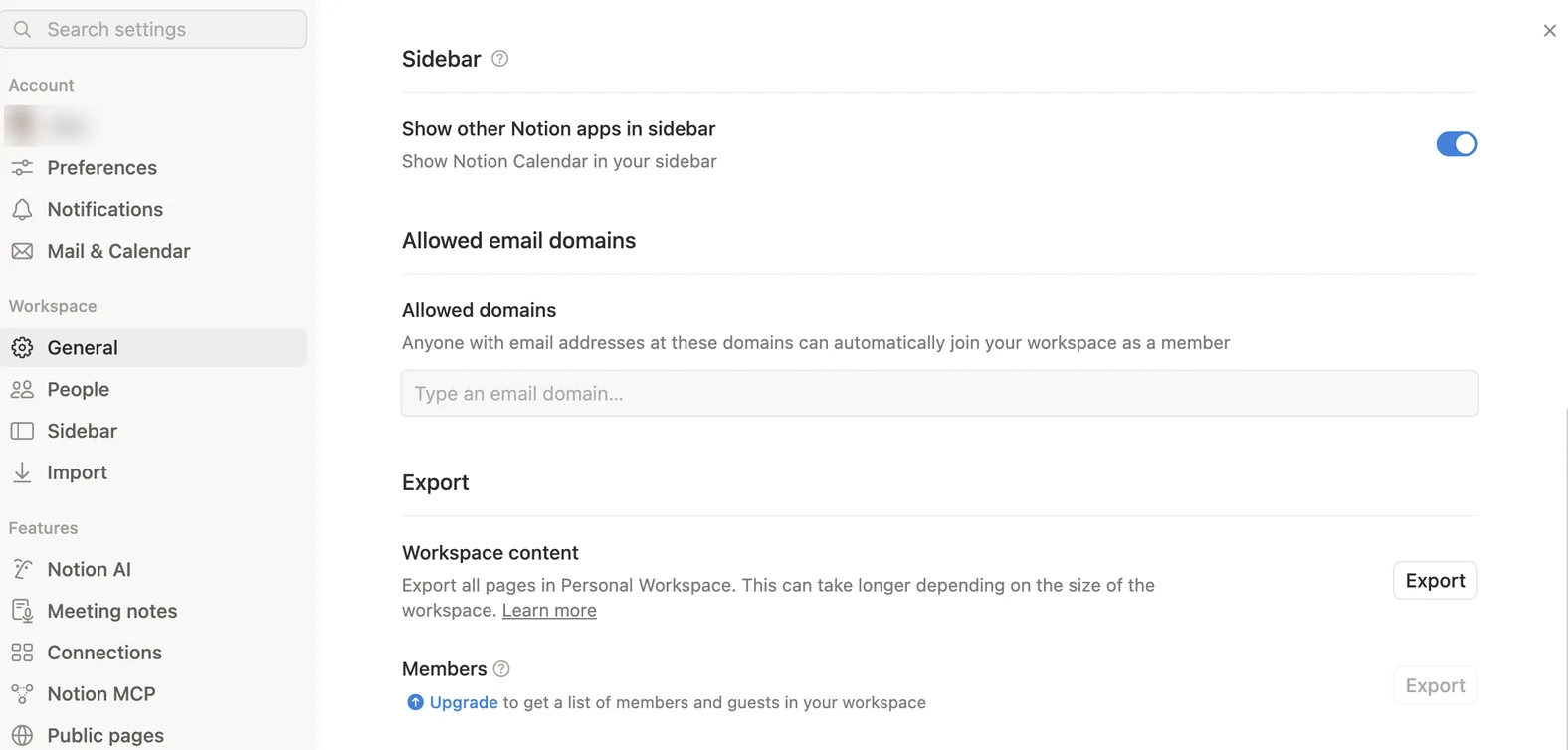
- Open Notion on the web or desktop and open Settings from the workspace menu.
- Under Workspace, open General and scroll to Export.
- Click Export next to Workspace content.
- For a single page and its subpages instead, open that page's three-dot menu and choose More > Export.
Pick HTML (recommended) or Markdown & CSV, with folders on
PDF exports cannot be read by the Notion importer. Choose "HTML" so your columns, colors, structure, links and formatting come across cleanly, or "Markdown & CSV" for plain Markdown.
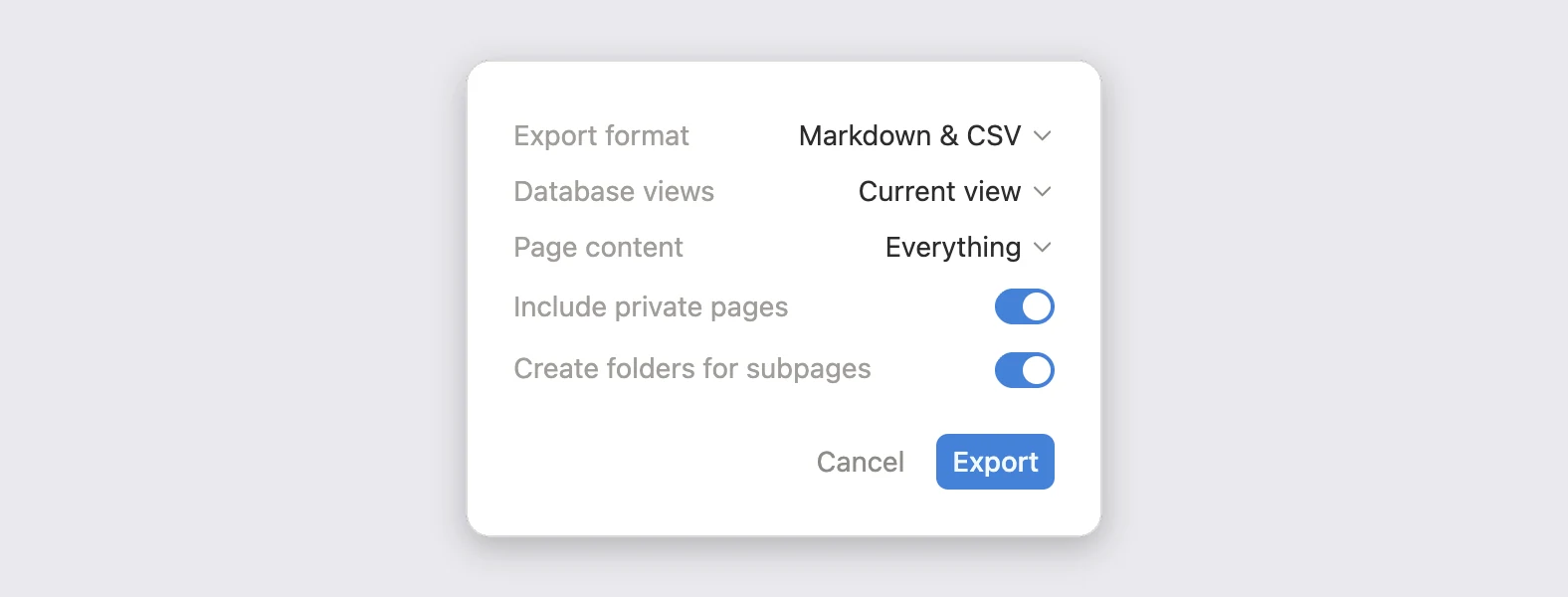
- Set Export format to "HTML" to keep side-by-side columns, column widths, text colors and highlights. "Markdown & CSV" works too if you do not use columns or colors.
- Set Page content to "Everything" so your images, PDFs and attached files are included.
- Turn on "Include private pages" (or "Include subpages" on a single-page export) and "Create folders for subpages".
- Click Export and save the .zip file.
What comes across
Notion appends a 32-character ID to every exported filename and internal link. PrivacyNotes strips those IDs from every title and folder name, removes the top-level "Private & Shared" wrapper, and rebuilds nested subpages as folders.
Headings, lists, nested checklists, tables, code blocks with language, math, underline and quotes come across as they were. With HTML export, side-by-side columns (2 to 5 columns, with ratios), text colors and highlights come across too. Notion callouts convert into PrivacyNotes callouts, links and mentions between exported pages become note-links, and uploaded images, PDFs and files are imported into your storage.
Database row pages import as notes inside a folder named after the database, with any Tags property added as tags. Database CSV table files are skipped and counted in the summary. Notion's own Markdown export flattens columns and leaves out text colors, highlights and pages in the Trash.
Import into PrivacyNotes
- Open PrivacyNotes and go to SettingsTransfer.
- Pick Notion as the source.
- Drop in the file you just exported, or click to browse.
- Check what the preview says will arrive, then start the import.
Still stuck? Ask your AI agent.
You get an answer in seconds instead of waiting for a reply. Your assistant reads all 191 answers and every import guide at once, so it can combine them, follow up on your question, and explain it in your own words. We never see any of it, because we do not run a chatbot.
- Copy the prompt.
- Paste it into ChatGPT, Claude, Gemini, or any other AI assistant.
- Ask your question, in your own language.
- Keep that chat open. Next time, ask straight away.
Show AI prompt
Answer my questions about PrivacyNotes using only its help center, its changelog and its security documentation.

Start here: https://privacynotes.app/llms-index.txt
It lists every question with the page that answers it. Fetch the one or two that match mine.
If you can only make one request, fetch https://privacynotes.app/llms-full.txt instead.
If you cannot fetch a .txt or .md file, read https://privacynotes.app/help, https://privacynotes.app/changelog and https://github.com/LifetimeLabsHQ/PrivacyNotes.app instead.

For what changed, or where something moved, fetch https://privacynotes.app/changelog.md.

For how the encryption works, what the server can read, or how to check any of it yourself, fetch https://privacynotes.app/docs/index.md and follow it to one of the documents it lists. That index is a router: cite the document, never the index.

Rules:
- Use only those pages. If they do not answer something, say so instead of guessing.
- Never invent a feature, a menu path, a price, or a limit.
- End your reply with the "Source:" URL from the page you used, exactly as written.
- Answer in the same language as my question.
- Never ask me for my recovery phrase, my PIN, or the contents of a note.

If no question follows, ask me what I would like to know.

My first question:
Never paste your recovery phrase, your PIN, or a note into an AI.