
Help & FAQ/Import guides

Export your browser bookmarks
Every desktop browser exports the same bookmarks .html file, and PrivacyNotes reads it with your folders and dates intact. Safari wraps that file in a .zip, which you can drop in unopened. No mobile browser can export at all, so turn on your browser's own sync and export from a computer.
Export from Chrome, Edge, Brave, Opera, or Vivaldi
- Open the bookmark manager: Ctrl+Shift+O, or Cmd+Option+B on a Mac. In Edge the same page is called Favorites.
- Click the "..." button at the top right of the manager and choose "Export bookmarks". Edge says "Export favorites".
- Save the file. It is an .html file with today's date in the name.
Export from Firefox
- Press Ctrl+Shift+O, or Cmd+Shift+O on a Mac, to open the Library window.
- Click "Import and Backup" in its toolbar and choose "Export Bookmarks to HTML...".
- Save it. The file is called bookmarks.html.
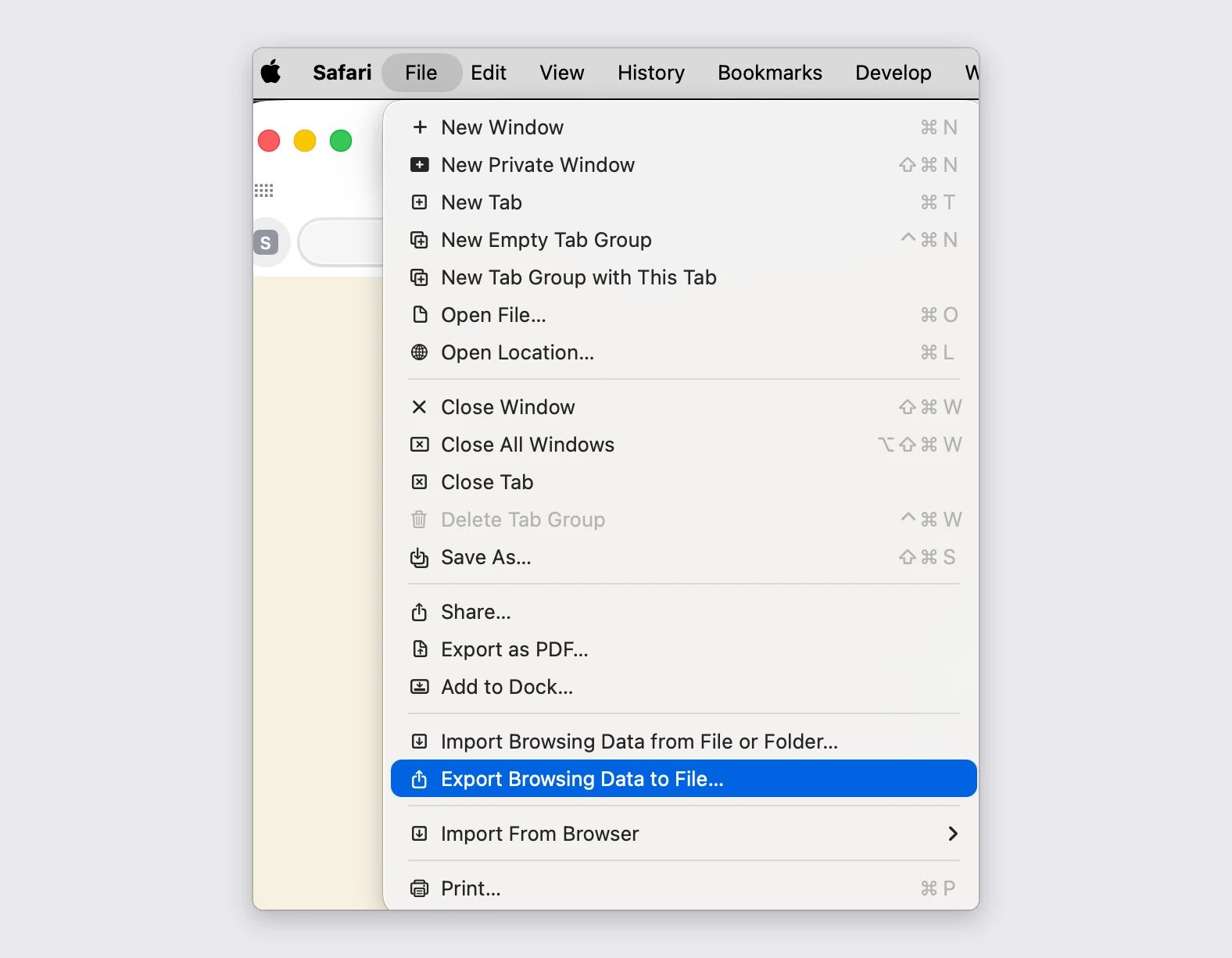
Export from Safari
- Choose File > "Export Browsing Data to File..." in the menu bar.
- Switch off everything except Bookmarks, then click Export.
- Safari saves a .zip. Drop that .zip in here as it is, or the Bookmarks.html inside it. Both work.
- Older Safari versions say File > Export > "Bookmarks..." instead, and save a plain .html file.
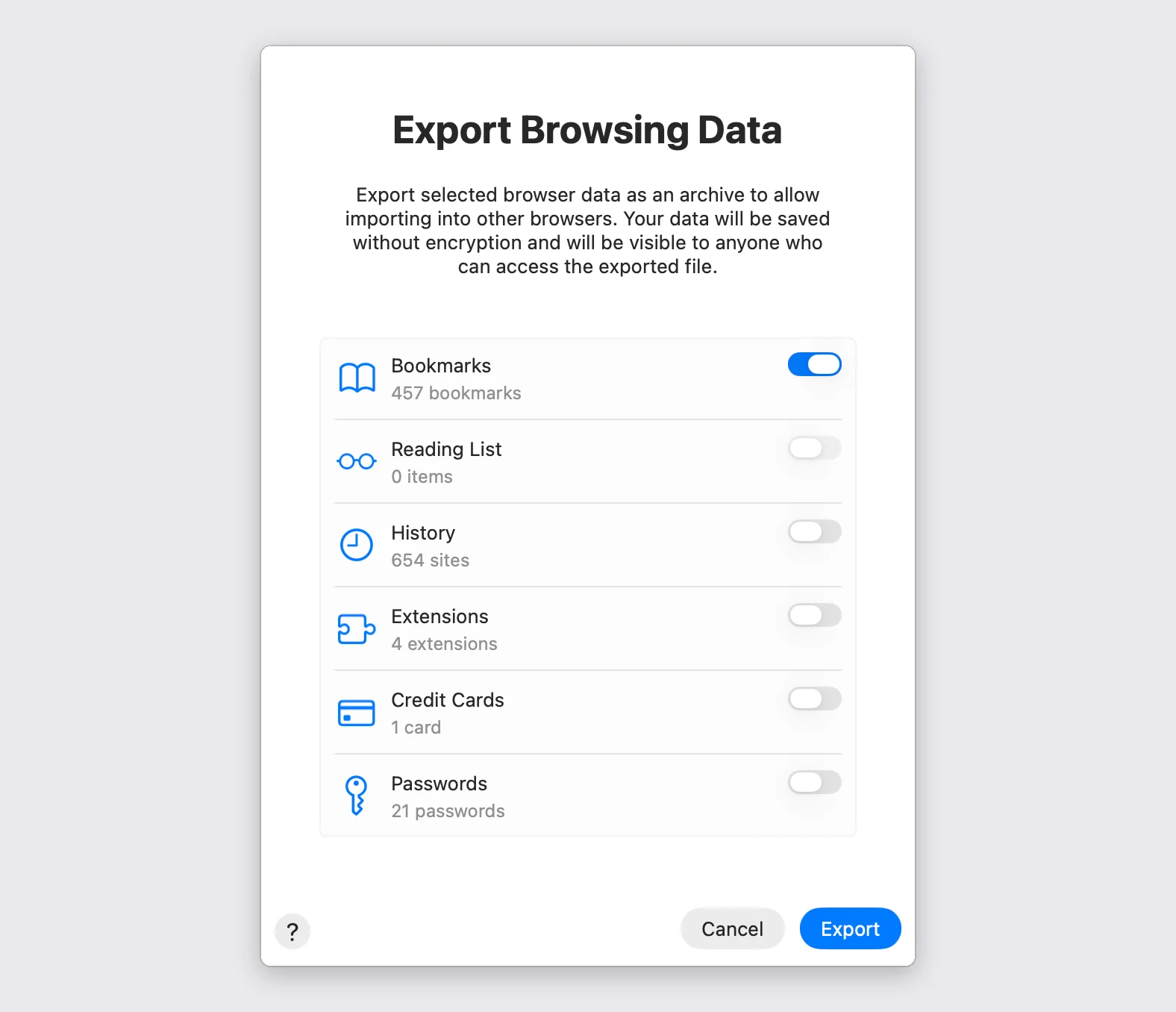
Leave only the Bookmarks switch on
The same window offers History, Extensions, Credit Cards and Passwords. Leave those off. PrivacyNotes reads nothing but the bookmarks out of the archive, but an export you then have to delete is one more plain copy of your passwords sitting in your Downloads folder.
What comes across
Every folder you had comes across, nested the way you left it, inside one new folder called Bookmarks. The bookmarks bar is the exception: its contents move up a level instead of becoming a folder, because each browser calls that bar something different in every language. Safari marks nothing, so its Favorites does arrive as a folder.
The day you saved each bookmark comes along. Safari is the one browser that writes no dates at all, so a Safari export arrives dated today.
Firefox is also the only browser that stores tags and an address-bar keyword with a bookmark. When your file carries them, the preview offers a checkbox to keep them, and both arrive as tags here.
Three things are left behind on purpose. Browser-only shortcuts like Most Visited are not real links, so they are counted and skipped. Website icons are not read out of the file either, because the copy saved inside it goes stale; PrivacyNotes fetches a fresh one instead. And a folder that held no bookmarks is not recreated.
Importing the same file twice is safe. A bookmark whose address you already saved is skipped rather than added again, and the preview tells you how many.
Taking them back out
Go to Settings > Import & Export > Export and choose "Bookmarks file (.html)". You get the same standard file, folders and all, which every browser reads. Your bookmarks are never locked in here.
Import into PrivacyNotes
- Open PrivacyNotes and go to Settings > Import & Export.
- Pick Browser bookmarks as the source.
- Drop in the file you just exported, or click to browse.
- Check what the preview says will arrive, then start the import.
Still stuck? Ask your AI agent.
You get an answer in seconds instead of waiting for a reply. Your assistant reads all 116 answers and every import guide at once, so it can combine them, follow up on your question, and explain it in your own words. We never see any of it, because we do not run a chatbot.
- Copy the prompt.
- Paste it into ChatGPT, Claude, Gemini, or any other AI assistant.
- Ask your question, in your own language.
- Keep that chat open. Next time, ask straight away.
Show AI prompt
Answer my questions about PrivacyNotes using only its help center, its changelog and its security documentation.

Start here: https://privacynotes.app/llms-index.txt
It lists every question with the page that answers it. Fetch the one or two that match mine.
If you can only make one request, fetch https://privacynotes.app/llms-full.txt instead.
If you cannot fetch a .txt or .md file, read https://privacynotes.app/help, https://privacynotes.app/changelog and https://github.com/LifetimeLabsDev/PrivacyNotes.app instead.

For what changed, or where something moved, fetch https://privacynotes.app/changelog.md.

For how the encryption works, what the server can read, or how to check any of it yourself, fetch https://privacynotes.app/docs/index.md and follow it to one of the documents it lists. That index is a router: cite the document, never the index.

Rules:
- Use only those pages. If they do not answer something, say so instead of guessing.
- Never invent a feature, a menu path, a price, or a limit.
- End your reply with the "Source:" URL from the page you used, exactly as written.
- Answer in the same language as my question.
- Never ask me for my recovery phrase, my PIN, or the contents of a note.

If no question follows, ask me what I would like to know.

My first question:
Never paste your recovery phrase, your PIN, or a note into an AI.