
Help & FAQ/Import guides
Export your Anytype space
Anytype exports a whole space at once as one zip in its Any-Block JSON format. That file brings your pages across with their tags, collections, tasks, links, and files.
Export the space as Any-Block JSON
One export holds one space. If you keep notes in several spaces, export each one and drop the zips in one after another.
- Open Anytype on your computer and go to the space you want to move.
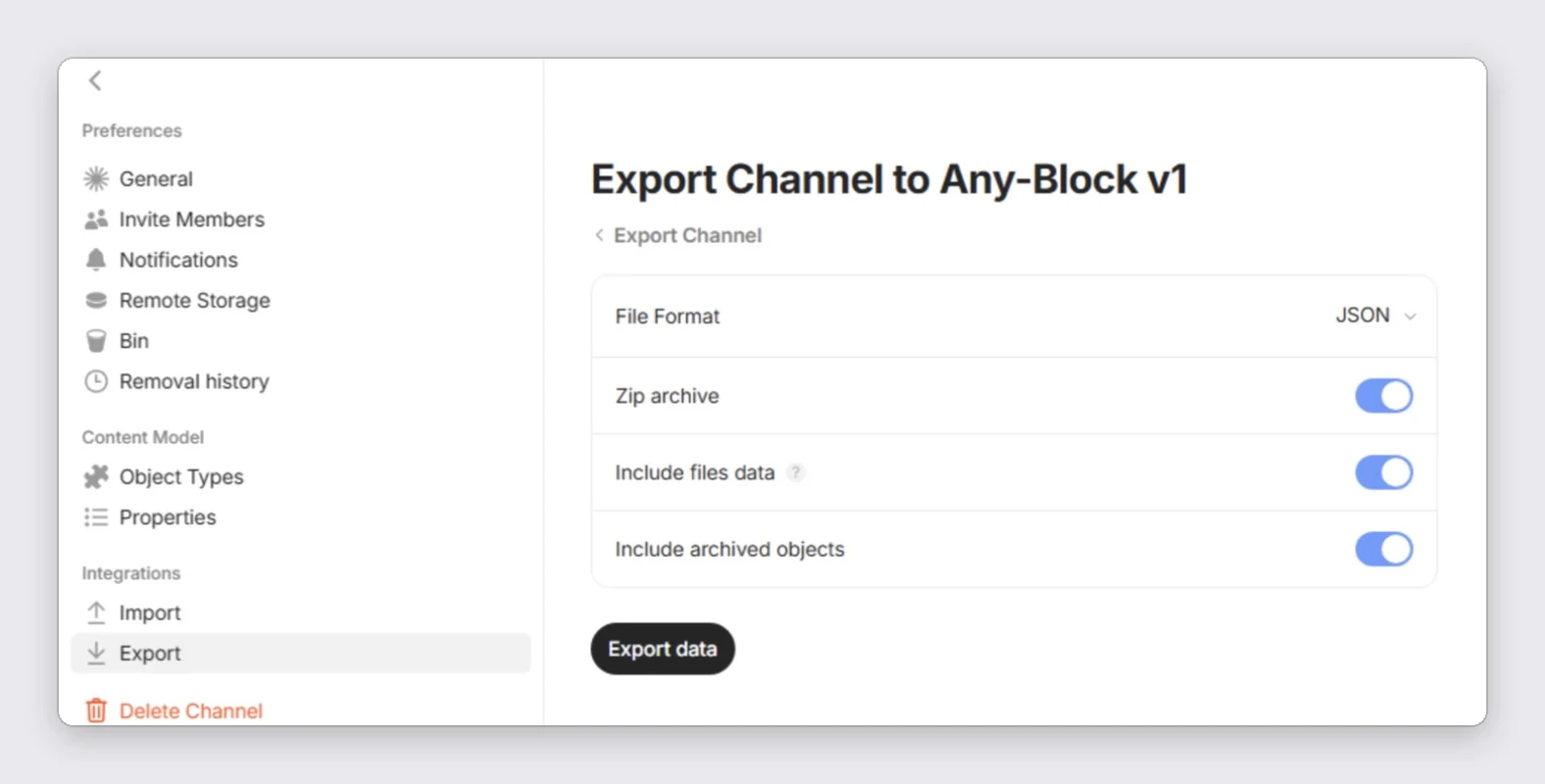
- Choose File > Export. Anytype opens the space settings on the Export page. Newer versions call a space a channel, so the page reads "Export Channel".
- Pick "Any-Block v1" and leave File Format on JSON.
- Turn on "Zip archive", "Include files data" and "Include archived objects".
- Click "Export data" and choose a folder. Anytype writes one .zip named after the space and the date.
- Drop that .zip in as it is.
Pick Any-Block JSON, not Markdown or Protobuf
The Markdown export keeps the text but drops underline, colors, callouts, alignment and code languages, and it leaves collections out. We read it if that is all you have, and the import preview says what it lost.
Any-Block also offers a Protobuf file format. It holds the same data in a binary form we do not read, so we ask for the JSON export instead. Any-Block v2 is marked as a preview by Anytype and is not a backup.
What comes along
Pages, notes, tasks and bookmarks become notes with their tags and the created and updated dates Anytype stored. Anytype has no folders, so a page in a collection lands in a folder named after the collection, and every other page lands at the top level.
Headings, lists, checklists, quotes, code with its language, tables, math and Mermaid diagrams come across as they were. Toggles become folds and callouts become callouts. Links and mentions between pages become note-links, and images and files are imported into your storage.
A task arrives as a task note, ticked when it was done. Custom properties are written as a short list at the top of the note. Pages in Anytype's bin go to your trash, so you can restore or delete them there.
Page icons and covers stay behind, and the import preview says how many. Favorites are not part of the export, so pin those notes again after the import.
Import into PrivacyNotes
- Open PrivacyNotes and go to SettingsTransfer.
- Pick Anytype as the source.
- Drop in the file you just exported, or click to browse.
- Check what the preview says will arrive, then start the import.
Still stuck? Ask your AI agent.
You get an answer in seconds instead of waiting for a reply. Your assistant reads all 188 answers and every import guide at once, so it can combine them, follow up on your question, and explain it in your own words. We never see any of it, because we do not run a chatbot.
- Copy the prompt.
- Paste it into ChatGPT, Claude, Gemini, or any other AI assistant.
- Ask your question, in your own language.
- Keep that chat open. Next time, ask straight away.
Show AI prompt
Answer my questions about PrivacyNotes using only its help center, its changelog and its security documentation.

Start here: https://privacynotes.app/llms-index.txt
It lists every question with the page that answers it. Fetch the one or two that match mine.
If you can only make one request, fetch https://privacynotes.app/llms-full.txt instead.
If you cannot fetch a .txt or .md file, read https://privacynotes.app/help, https://privacynotes.app/changelog and https://github.com/LifetimeLabsHQ/PrivacyNotes.app instead.

For what changed, or where something moved, fetch https://privacynotes.app/changelog.md.

For how the encryption works, what the server can read, or how to check any of it yourself, fetch https://privacynotes.app/docs/index.md and follow it to one of the documents it lists. That index is a router: cite the document, never the index.

Rules:
- Use only those pages. If they do not answer something, say so instead of guessing.
- Never invent a feature, a menu path, a price, or a limit.
- End your reply with the "Source:" URL from the page you used, exactly as written.
- Answer in the same language as my question.
- Never ask me for my recovery phrase, my PIN, or the contents of a note.

If no question follows, ask me what I would like to know.

My first question:
Never paste your recovery phrase, your PIN, or a note into an AI.