Help & FAQ/Import guides
Export your Diaro journal
Diaro exports your whole journal as a .zip backup from its mobile app, and PrivacyNotes imports every entry into Journals with its folders, tags, moods, places, weather and photos.
Create an unencrypted backup in the Diaro app
Creating a backup in the mobile app is free and needs no Pro subscription. Diaro Online only exports PDF, DOCX and TXT on paid plans and has no backup download button.
- Open Diaro on Android or iOS, open the left menu, and tap the Settings gear.
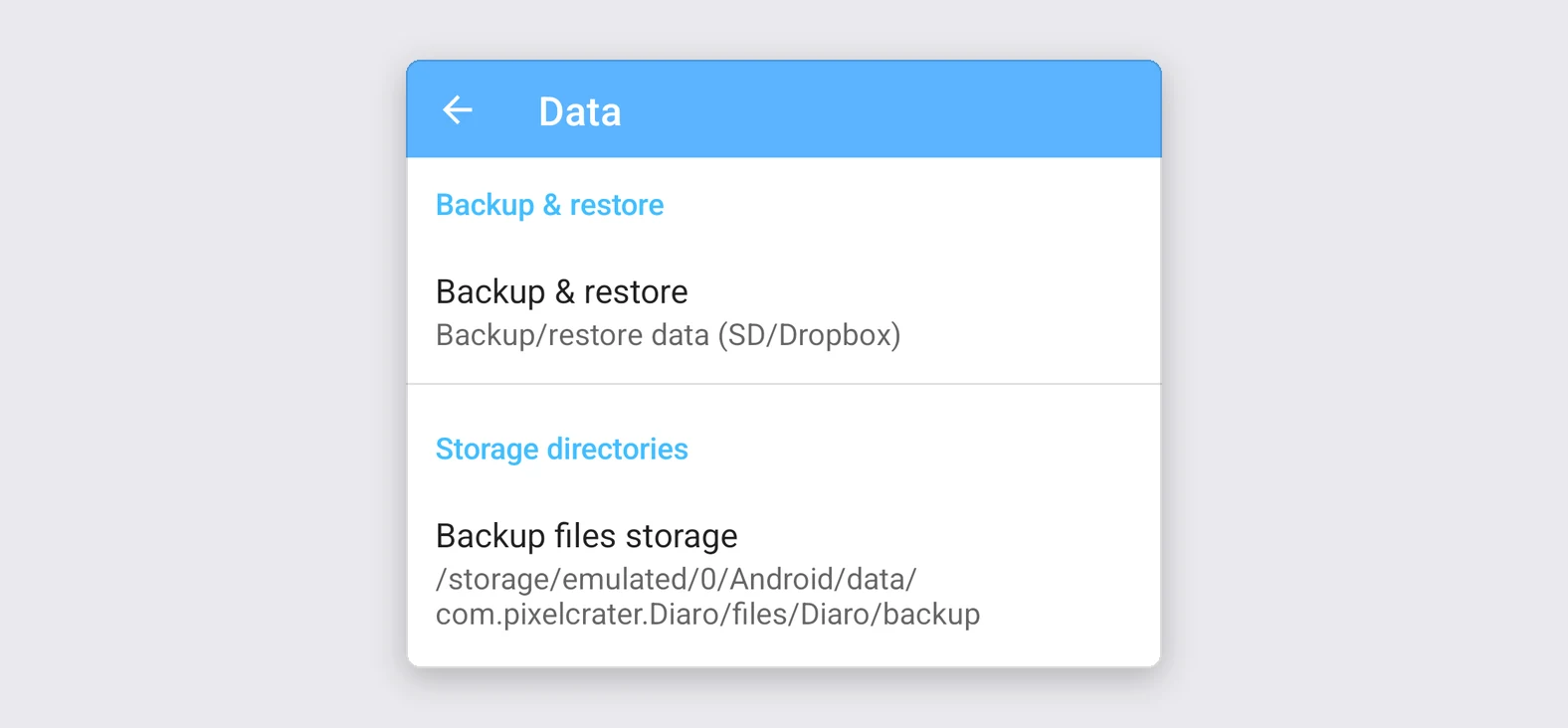
- Choose Data, scroll down to Backup & restore, and tap Backup & restore.
- Tap the + button in the top right.
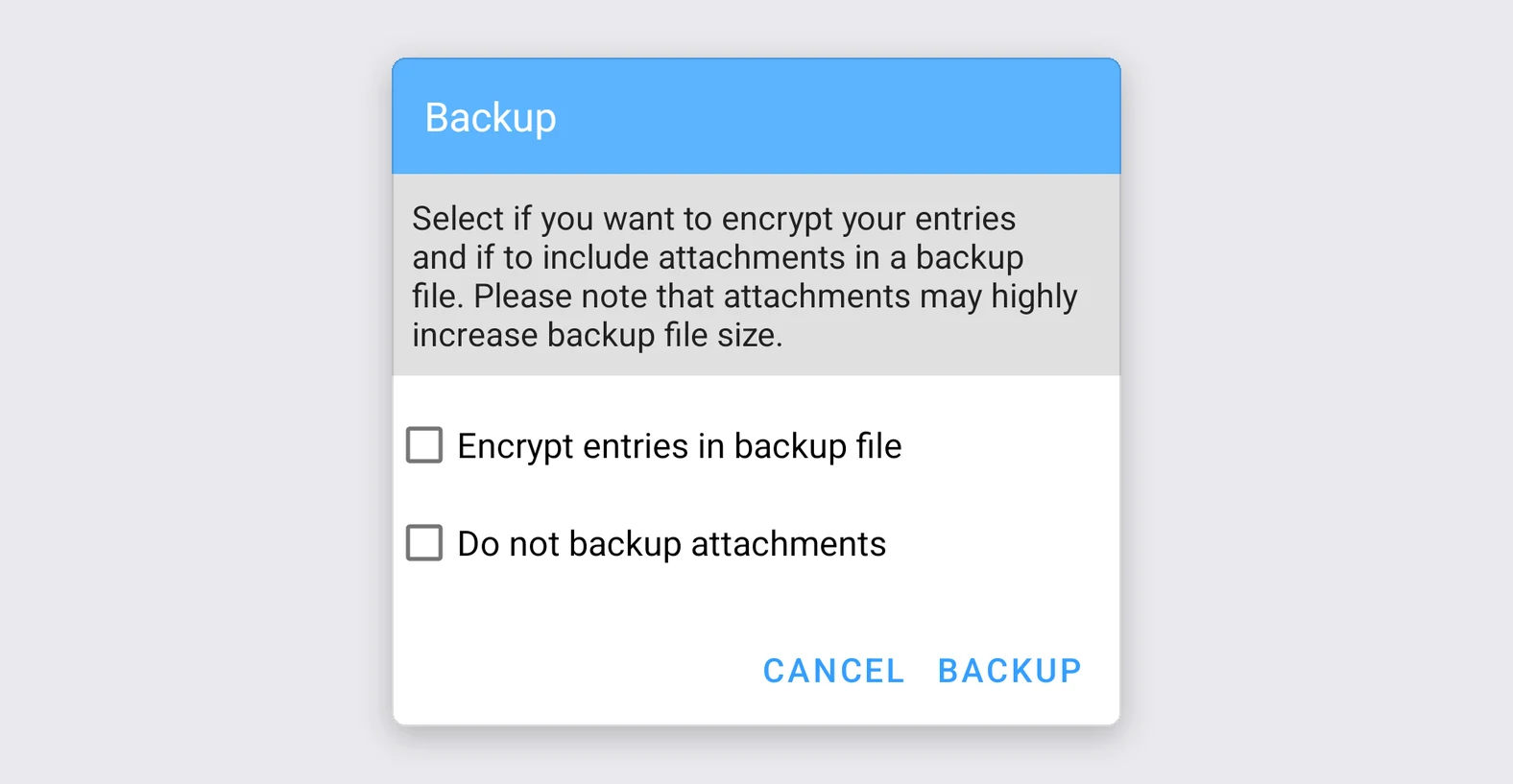
- Leave "Encrypt entries in backup file" unchecked and "Do not backup attachments" unchecked, then tap Backup.
- Copy the Diaro_YYYYMMDD.zip file from the backup folder shown under Storage directories (or from Dropbox if you synced it there) and drop it into PrivacyNotes.
Pick the unencrypted .zip backup, not PDF, TXT, CSV or encrypted backups
An unencrypted backup writes DiaroBackup.xml and your media/photo folder into one .zip file. If you tick "Encrypt entries in backup file", Diaro writes DiaroBackup.denc instead, which PrivacyNotes cannot unlock and refuses with a reminder to turn encryption off.
A bare DiaroBackup.xml file imports all text and metadata on its own, without photos, and the summary counts every missing picture. Tick off "Do not backup attachments" and drop the full .zip to bring your photos along.
What comes across
Every entry lands in Journals on the calendar day in the entry's recorded time zone offset. Entries without a title take the date title a new entry of that day gets, and bare web links become clickable.
Diaro folders become folders, tags stay tags, and moods fill in the mood tracker from their Diaro weight (custom mood names also appear on the top line). Locations with coordinates fill the entry's place chip, name-only places and weather sit on one line at the top, and photos import in their original order.
Import into PrivacyNotes
- Open PrivacyNotes and go to SettingsTransfer.
- Pick Diaro as the source.
- Drop in the file you just exported, or click to browse.
- Check what the preview says will arrive, then start the import.
Still stuck? Ask your AI agent.
You get an answer in seconds instead of waiting for a reply. Your assistant reads all 191 answers and every import guide at once, so it can combine them, follow up on your question, and explain it in your own words. We never see any of it, because we do not run a chatbot.
- Copy the prompt.
- Paste it into ChatGPT, Claude, Gemini, or any other AI assistant.
- Ask your question, in your own language.
- Keep that chat open. Next time, ask straight away.
Show AI prompt
Answer my questions about PrivacyNotes using only its help center, its changelog and its security documentation.

Start here: https://privacynotes.app/llms-index.txt
It lists every question with the page that answers it. Fetch the one or two that match mine.
If you can only make one request, fetch https://privacynotes.app/llms-full.txt instead.
If you cannot fetch a .txt or .md file, read https://privacynotes.app/help, https://privacynotes.app/changelog and https://github.com/LifetimeLabsHQ/PrivacyNotes.app instead.

For what changed, or where something moved, fetch https://privacynotes.app/changelog.md.

For how the encryption works, what the server can read, or how to check any of it yourself, fetch https://privacynotes.app/docs/index.md and follow it to one of the documents it lists. That index is a router: cite the document, never the index.

Rules:
- Use only those pages. If they do not answer something, say so instead of guessing.
- Never invent a feature, a menu path, a price, or a limit.
- End your reply with the "Source:" URL from the page you used, exactly as written.
- Answer in the same language as my question.
- Never ask me for my recovery phrase, my PIN, or the contents of a note.

If no question follows, ask me what I would like to know.

My first question:
Never paste your recovery phrase, your PIN, or a note into an AI.