ความช่วยเหลือและคำถามที่พบบ่อย/คู่มือการนำเข้า
ส่งออกบันทึกประจำวันจาก Diaro
Diaro ส่งออกบันทึกประจำวันทั้งหมดของคุณเป็นข้อมูลสำรอง .zip จากแอปมือถือ และ PrivacyNotes จะนำเข้าทุกรายการไปยังบันทึกประจำวัน พร้อมโฟลเดอร์ แท็ก อารมณ์ สถานที่ สภาพอากาศ และรูปถ่าย
สร้างข้อมูลสำรองแบบไม่เข้ารหัสในแอป Diaro
การสร้างข้อมูลสำรองในแอปมือถือทำได้ฟรีและไม่ต้องมีการสมัครสมาชิก Pro ส่วน Diaro Online ส่งออกได้เฉพาะ PDF, DOCX และ TXT ในแพ็กเกจแบบเสียเงิน และไม่มีปุ่มดาวน์โหลดข้อมูลสำรอง
- เปิด Diaro บน Android หรือ iOS เปิดเมนูด้านซ้าย แล้วแตะไอคอนฟันเฟือง Settings
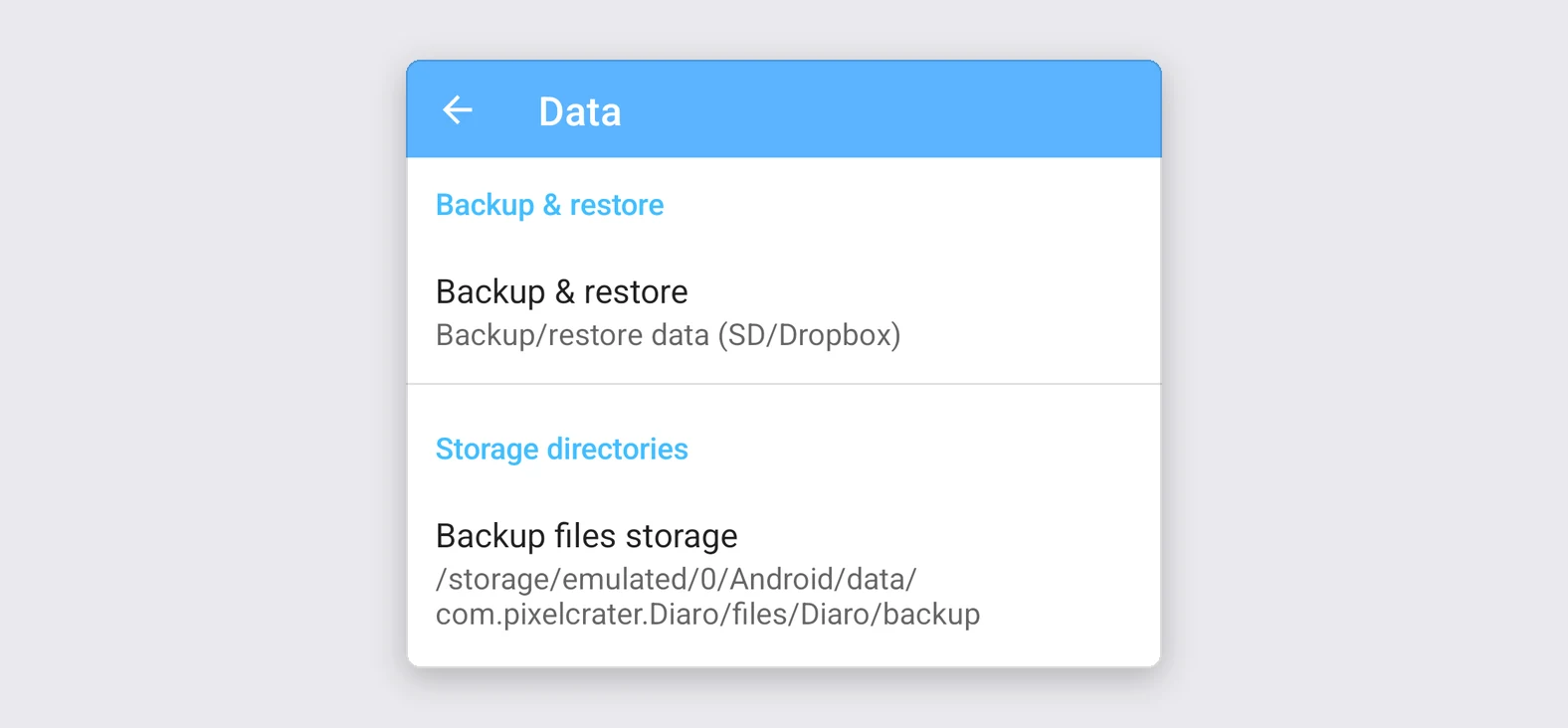
- เลือก Data เลื่อนลงไปที่ Backup & restore แล้วแตะ Backup & restore
- แตะปุ่ม + ที่มุมขวาบน
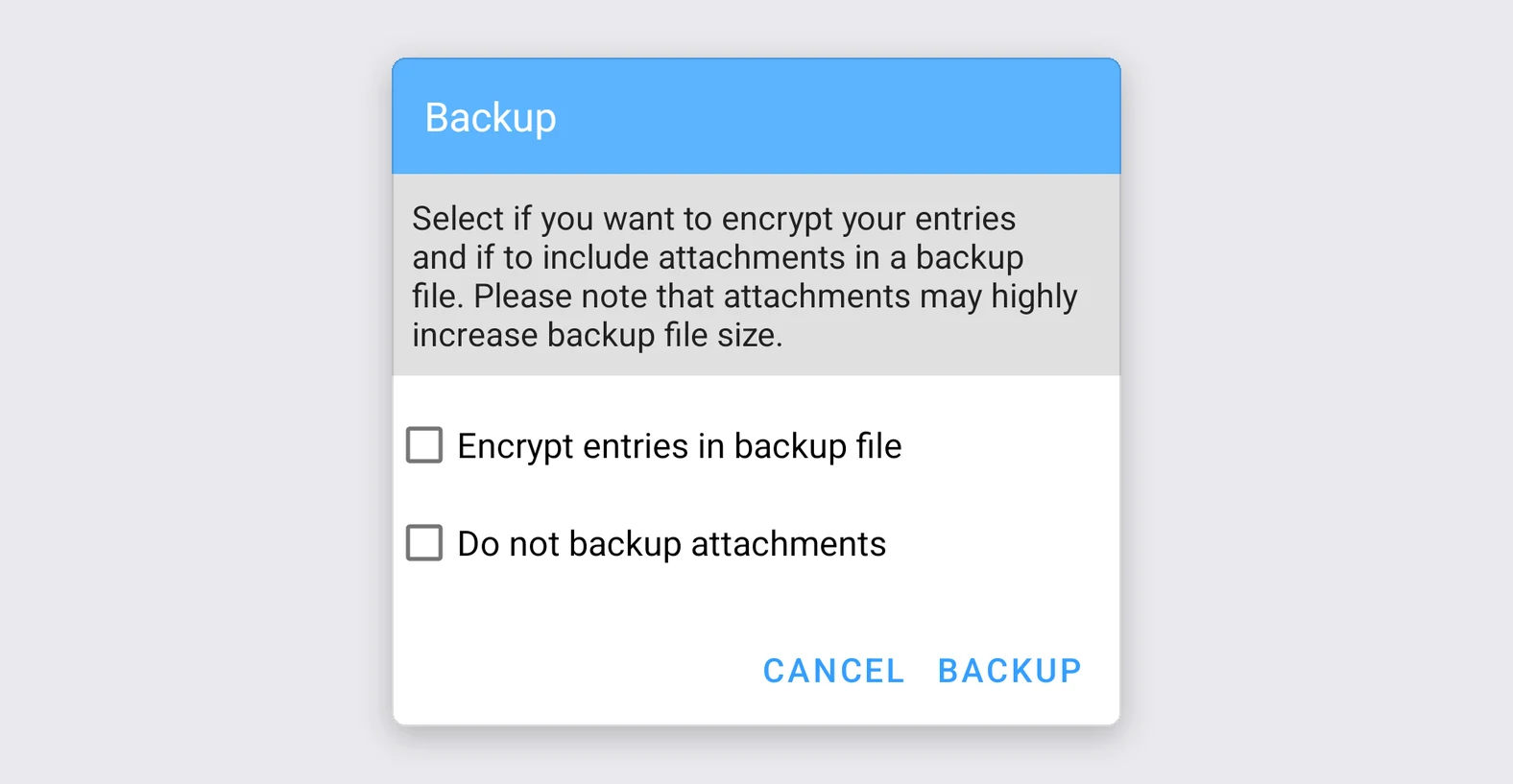
- ปล่อย "Encrypt entries in backup file" และ "Do not backup attachments" ไว้โดยไม่ติ๊ก แล้วแตะ Backup
- คัดลอกไฟล์ Diaro_YYYYMMDD.zip จากโฟลเดอร์ข้อมูลสำรองที่แสดงใต้ Storage directories (หรือจาก Dropbox หากคุณซิงค์ไว้ที่นั่น) แล้วลากมาวางใน PrivacyNotes
เลือกข้อมูลสำรอง .zip แบบไม่เข้ารหัส ไม่ใช่ PDF, TXT, CSV หรือข้อมูลสำรองที่เข้ารหัส
ข้อมูลสำรองแบบไม่เข้ารหัสจะเขียนไฟล์ DiaroBackup.xml และโฟลเดอร์ media/photo ของคุณไว้ในไฟล์ .zip เดียว หากติ๊ก "Encrypt entries in backup file" Diaro จะเขียนไฟล์ DiaroBackup.denc แทน ซึ่ง PrivacyNotes ปลดล็อกไม่ได้และจะปฏิเสธพร้อมข้อความเตือนให้ปิดการเข้ารหัส
ไฟล์ DiaroBackup.xml เปล่า ๆ นำเข้าข้อความและเมทาดาทาทั้งหมดได้เองโดยไม่มีรูปถ่าย และสรุปการนำเข้าจะนับรูปภาพที่หายไปทุกรูป ให้เอาเครื่องหมายถูกออกจาก "Do not backup attachments" แล้วลากไฟล์ .zip ฉบับเต็มมาวางเพื่อนำรูปถ่ายของคุณมาด้วย
สิ่งที่นำเข้ามาได้
ทุกรายการจะไปอยู่ในบันทึกประจำวันตามวันในปฏิทินของเขตเวลาที่เก็บไว้ในรายการนั้น รายการที่ไม่มีชื่อเรื่องจะใช้ชื่อวันที่เหมือนรายการใหม่ของวันนั้น และลิงก์เว็บเปล่า ๆ จะกลายเป็นลิงก์ที่คลิกได้
โฟลเดอร์ของ Diaro จะกลายเป็นโฟลเดอร์ แท็กยังคงเป็นแท็ก และอารมณ์จะเติมลงในตัวติดตามอารมณ์ตามค่าน้ำหนักจาก Diaro (ชื่ออารมณ์ที่ตั้งเองจะแสดงในบรรทัดด้านบนด้วย) ตำแหน่งที่มีพิกัดจะเติมลงในชิปสถานที่ของรายการ สถานที่ที่มีเพียงชื่อกับสภาพอากาศจะอยู่ในบรรทัดเดียวกันด้านบน และรูปถ่ายจะนำเข้าตามลำดับเดิม
นำเข้าสู่ PrivacyNotes
- เปิด PrivacyNotes แล้วไปที่ การตั้งค่าโอนย้าย
- เลือก Diaro เป็นแหล่งที่มา
- ลากไฟล์ที่เพิ่งส่งออกมาวาง หรือคลิกเพื่อเลือกไฟล์
- ตรวจดูว่าตัวอย่างบอกว่าจะมีอะไรนำเข้ามาบ้าง แล้วเริ่มนำเข้า
ยังติดอยู่ใช่ไหม? ถามผู้ช่วย AI ของคุณ
คุณได้คำตอบในไม่กี่วินาทีแทนที่จะรอเราตอบกลับ ผู้ช่วยของคุณอ่านคำตอบทั้งหมด 191 ข้อและคู่มือการนำเข้าทุกฉบับพร้อมกัน จึงรวมข้อมูลเข้าด้วยกัน ถามต่อจากคำถามของคุณ และอธิบายด้วยคำพูดของคุณเองได้ เราไม่เห็นข้อมูลเหล่านั้นเลย เพราะเราไม่ได้ให้บริการแชตบอต
- คัดลอกพรอมต์
- วางลงใน ChatGPT, Claude, Gemini หรือผู้ช่วย AI อื่นใดก็ได้
- ถามคำถามเป็นภาษาของคุณเอง
- เปิดแชตนั้นค้างไว้ ครั้งหน้าถามได้ทันที
แสดงพรอมต์ AI
Answer my questions about PrivacyNotes using only its help center, its changelog and its security documentation.

Start here: https://privacynotes.app/llms-index.txt
It lists every question with the page that answers it. Fetch the one or two that match mine.
If you can only make one request, fetch https://privacynotes.app/llms-full.txt instead.
If you cannot fetch a .txt or .md file, read https://privacynotes.app/th/help, https://privacynotes.app/changelog and https://github.com/LifetimeLabsHQ/PrivacyNotes.app instead.

For what changed, or where something moved, fetch https://privacynotes.app/changelog.md.

For how the encryption works, what the server can read, or how to check any of it yourself, fetch https://privacynotes.app/docs/index.md and follow it to one of the documents it lists. That index is a router: cite the document, never the index.

Rules:
- Use only those pages. If they do not answer something, say so instead of guessing.
- Never invent a feature, a menu path, a price, or a limit.
- End your reply with the "Source:" URL from the page you used, exactly as written.
- Answer in the same language as my question.
- Never ask me for my recovery phrase, my PIN, or the contents of a note.

If no question follows, ask me what I would like to know.

My first question:
อย่าวางวลีกู้คืน PIN หรือโน้ตของคุณลงใน AI เด็ดขาด